
What recipe change requests do
Recipes rarely sit still. Chefs, dietitians, and operations leads often spot things that need to change on recipes they don't own — a cost update, a portion tweak, a new allergen note. Until now, those suggestions lived in emails, Slack threads, or notebooks, and some never made it into the live recipe.
Recipe Approvals turns that back-and-forth into a structured workflow. Team members who don't have edit rights on a specific field can submit a change request, and the person who owns the field reviews it and decides whether to apply it or dismiss it. Your live recipes stay untouched until someone with the right permissions signs off.
The feature is an opt-in company setting, so nothing changes until an admin enables it. You can also turn it off at any time.
Who does what
| Role | What they can do |
|---|---|
| A user without edit rights on a field | Submit a change request suggesting a new value for that field |
| A user with edit rights on a field | Review pending change requests, accept them (applying the change), or reject them (dismissing with no change) |
| An admin | Turn the feature on or off for the whole company under Settings |
Field-level edit rights still work the same way. If a user can already edit a specific field, saving a change to that field updates the recipe immediately. The Request change option only appears for fields a user cannot edit directly.
Turn on the company setting (admins)
An admin has to enable the feature before anyone can submit or review change requests.
- Open Settings from the profile dropdown.
- Go to the Company Settings tab.
- Find the recipe editing section.
- Toggle on Allow change requests from view-only users.
- Save your changes.
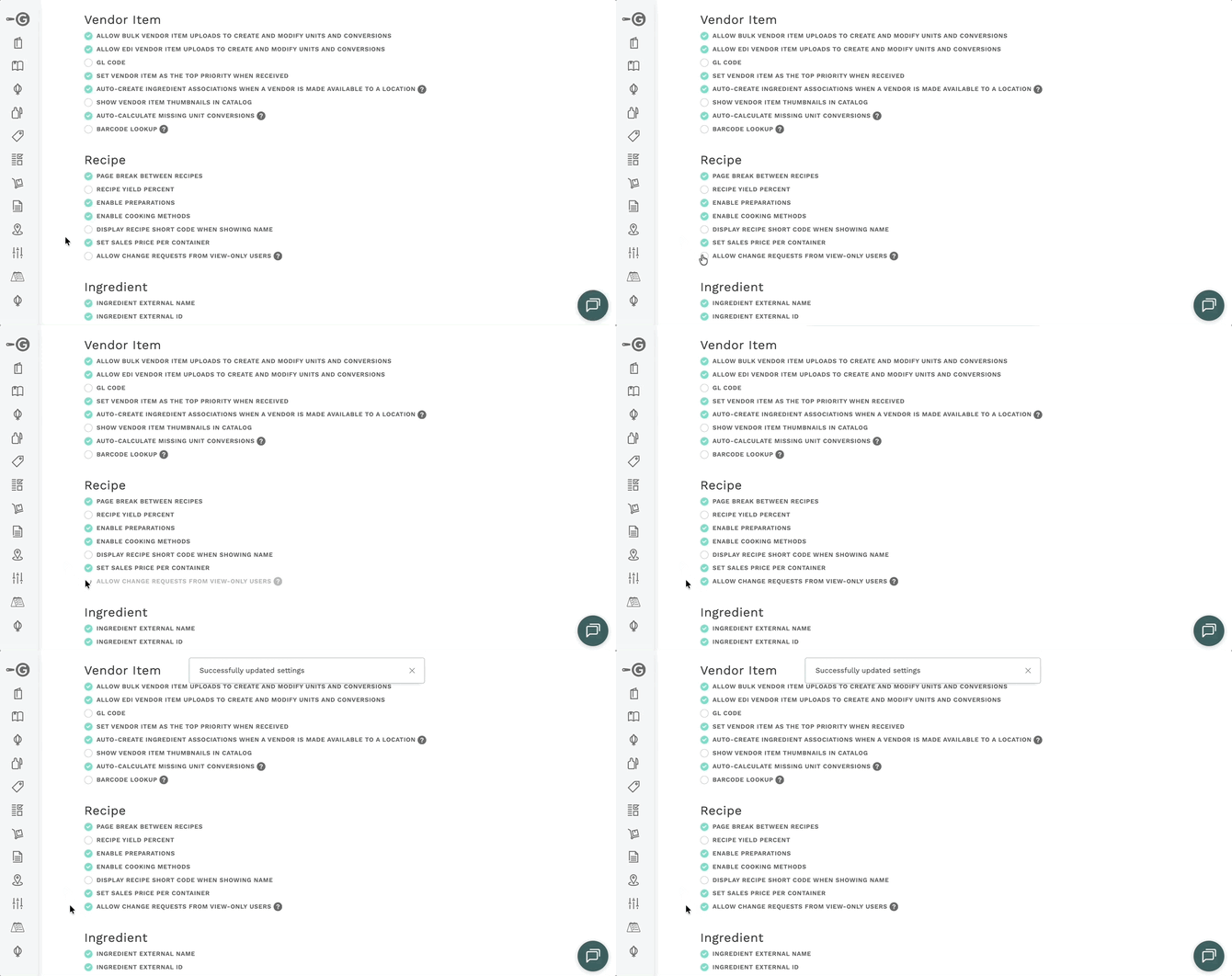
Before turning this on, make sure your recipe owners know what to expect. Once the setting is live, they'll start seeing change requests from team members in the Inbox and on individual recipes.
When Recipe Approvals is a good fit
Consider turning this on when you have team members who:
- Know your recipes well but aren't the recipe owners — trainers, dietitians, sous chefs, regional ops leads
- Frequently suggest small updates like cost corrections, portion tweaks, or allergen notes
- Would benefit from documenting their suggestions instead of emailing or messaging them
Suggest a change on a recipe (view-only users)
If you don't have edit rights on a field you want to update, you'll now see a Request change option in the recipe's actions menu.
- Open the recipe you'd like to update.
- Click the actions dropdown.
- Select Request change. The recipe opens in an editable state.
- Make the changes you want to propose in the fields you'd normally be unable to edit.
- Click Submit when you're done.
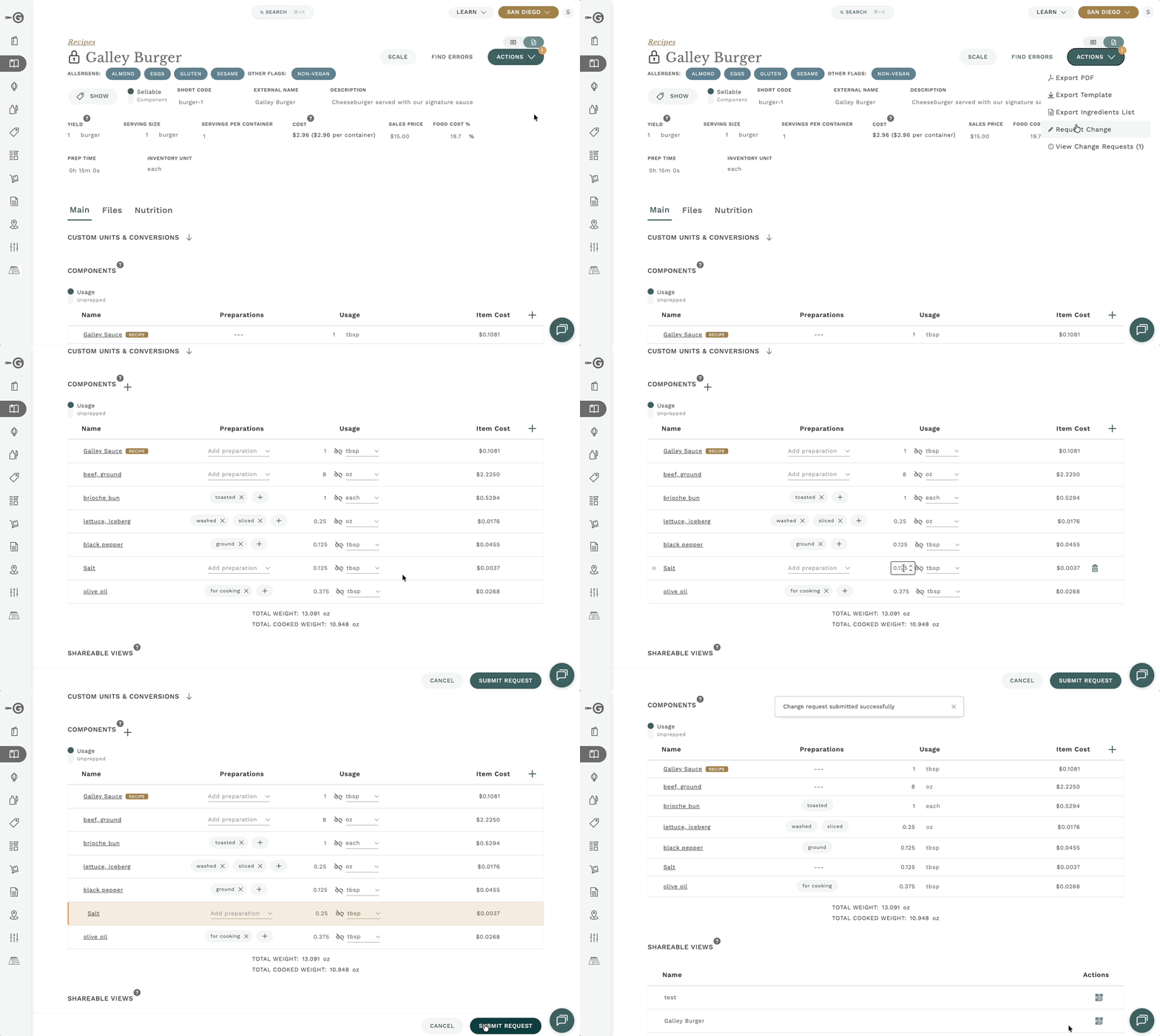
Your proposed changes do not affect the live recipe. They're held as a pending request until an approver reviews them. You can keep working on other recipes while you wait.
What happens after you submit
- Your change request appears in the approvers' Inbox and in the recipe's change request panel.
- The live recipe stays unchanged until an approver accepts the request.
- If the approver rejects the request, no change is made to the recipe.
Open the Inbox (approvers)
The Inbox is the fastest way to see every pending change request across every recipe, in one list. Use it when you want to triage requests in bulk rather than open recipes one at a time.
- Click Inbox from the profile dropdown.
- Scan the list of pending change requests. Each entry shows the recipe it belongs to, the field being changed, and the requester.
- Click a request to expand it and review the details before accepting or rejecting.
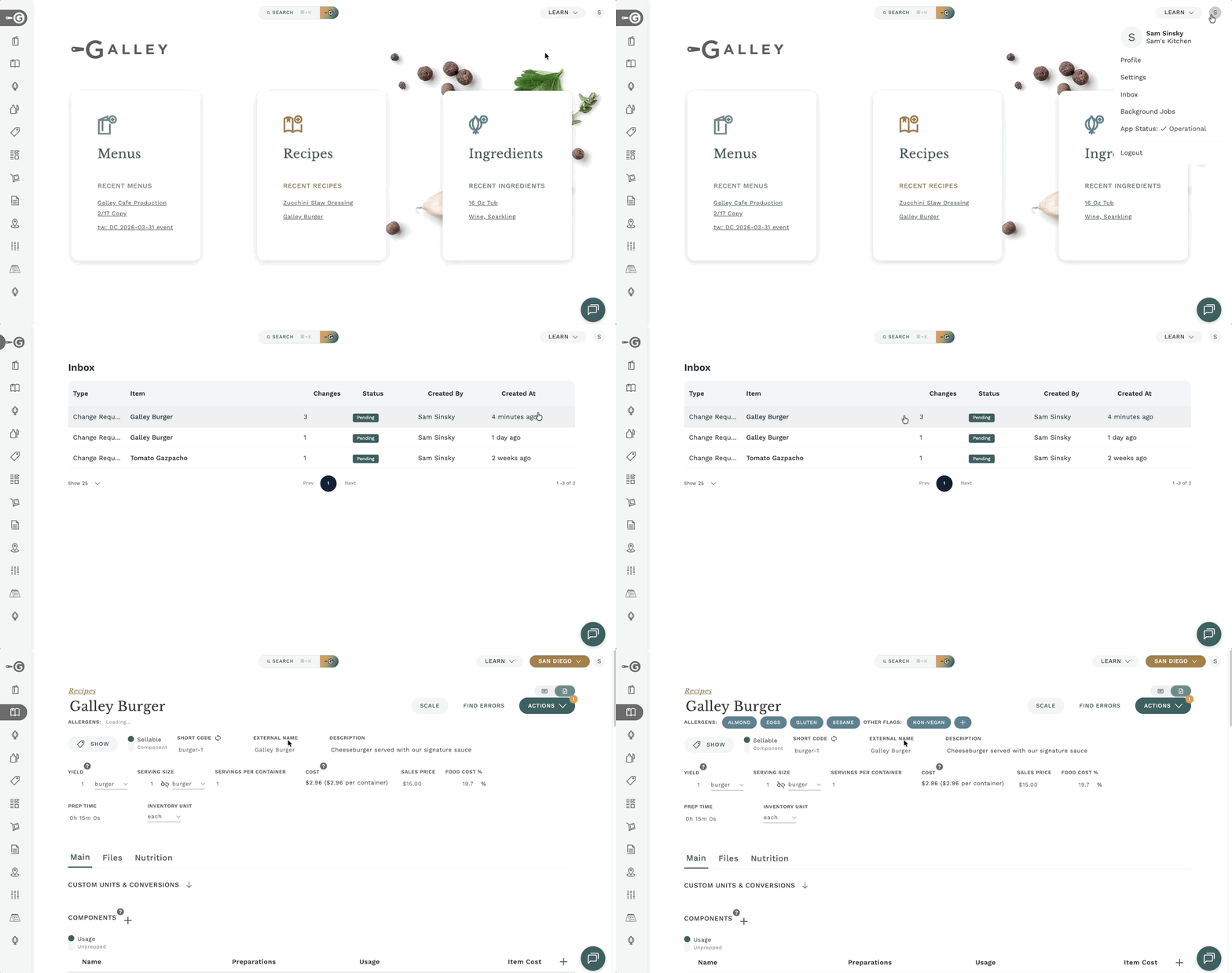
Bookmark the Inbox if you regularly approve requests. It gives you one place to review everything that's waiting on your decision.
Prefer reviewing in context?
You can also see change requests scoped to a single recipe: open the recipe, click the actions menu, and select View change requests. A side panel slides in showing just that recipe's pending requests, without leaving the recipe you're working on.
Decide on a request (approvers)
Whether you're reviewing from the Inbox or from a recipe's side panel, the decision flow is the same.
- Click a change request to expand it and see the proposed values.
- Click the magnifying-glass icon next to any changed field. The recipe jumps to that field and highlights it so you can see the current value in context.
- Compare the proposed value with what's live today.
- Click Accept to apply the change to the recipe, or Reject to dismiss it. Rejected requests never touch the recipe.
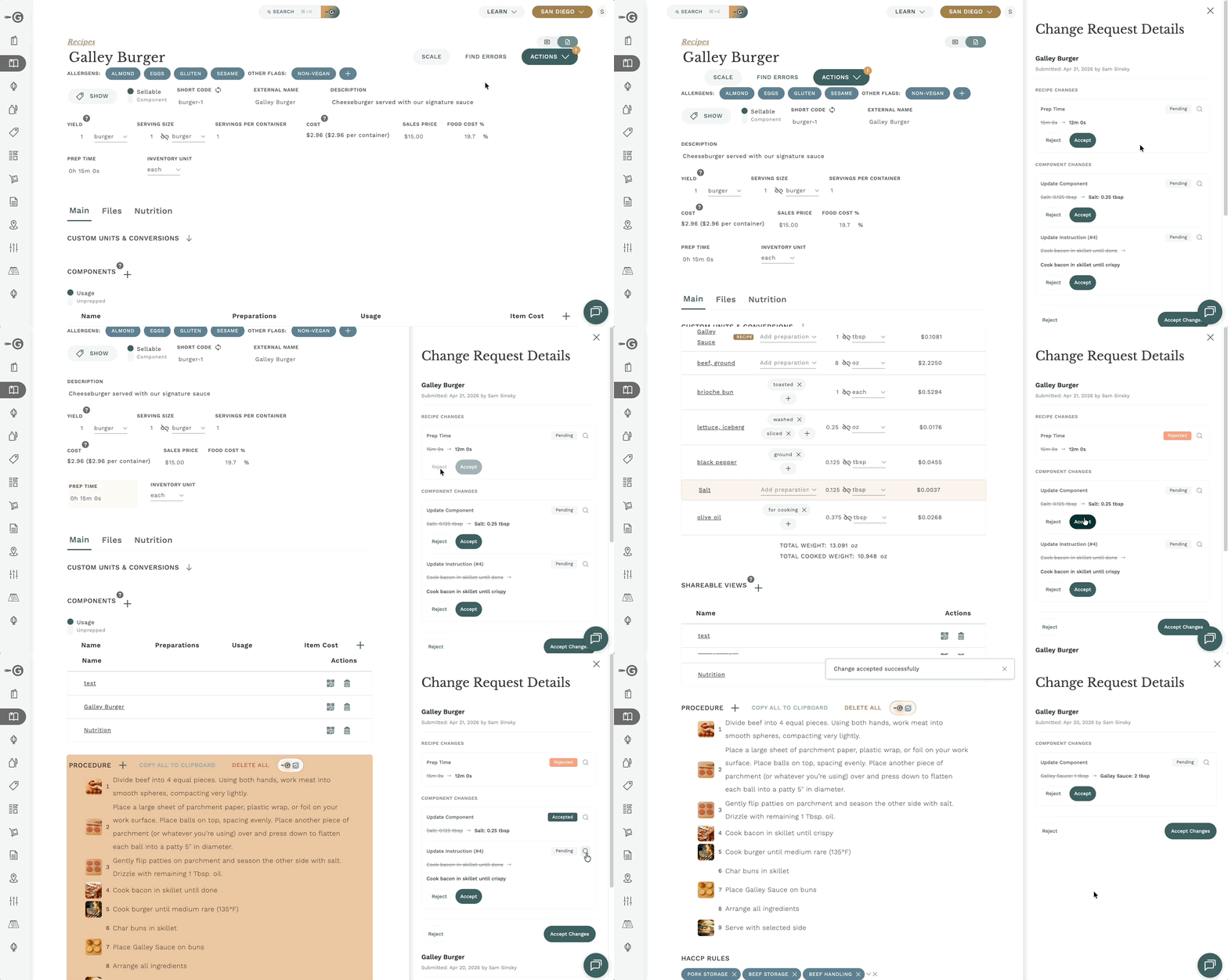
Accept and Reject are final. If you accept a request you didn't mean to, you can edit the recipe directly to revert the value — there's no one-click undo for approvals.
Handling multiple requests for the same field
If more than one person has suggested a change to the same field, each request is reviewed independently. Accepting one request does not automatically dismiss the others, so review each of them before moving on.
Disable the workflow
You can turn the feature off at any time. When it's off, the Request change option disappears and no new requests can be submitted.
- Go to Settings > Company Settings.
- Toggle off Allow change requests from view-only users.
- Save.
Turning the setting off stops new requests and hides the Request change option. Pending requests that haven't been accepted or rejected are not automatically cleaned up. If you want to address them, review pending requests before disabling the feature.
Frequently asked questions
What if multiple users submit change requests for the same field?
Each request is reviewed independently. An approver decides which request (if any) to accept. Accepting one request does not automatically dismiss the others — review each of them so you don't lose useful context.
Are requesters notified when their request is accepted or rejected?
Requesters can see the status of their request by opening the recipe's change requests panel. There's no automatic notification today, so if context matters, reach out to the requester directly when you reject a request.
Does Recipe Approvals work on sub-recipes and preparations?
It applies to recipe-level fields. Field-level edit rights follow whatever permissions you already have in place — the setting doesn't create new permission rules, it just opens a path for requesting a change on a field you can't edit.
Will turning the setting off delete pending requests?
No. Turning it off stops new requests and hides the Request change option, but existing requests aren't cleaned up automatically. Review pending requests before disabling the feature if you want to address them.