
After a production run, recording what was actually produced used to mean opening each menu one by one and updating Volume Sold on every item. For large operations with multiple menus and dozens of items, that's a lot of clicking.
Now you can log produced quantities for all your menus at once, right from the Production List page. Select the menus you produced, review or adjust individual quantities, and save everything in a single action.
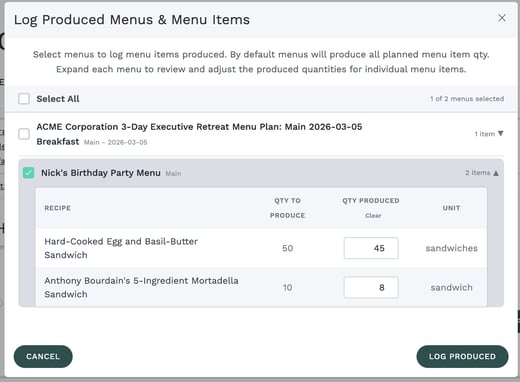
How It Works
|
What You Can Do
|
|
💡 Good to KnowEach time you log produced quantities, the new values replace the previous ones. The system treats your entry as the total produced — it doesn't add to earlier amounts. If your company has inventory tracking enabled, this also triggers raw material depletion automatically. |
Requirements
To use this feature, your user role must have the Edit Menu Item Volume Sold permission enabled. The feature must also be activated for your company. Contact your administrator if you don't see the button.
Ready to Try It?
Open any Production List with menus loaded and look for the Log Produced Menus button next to the Production List heading. Select your menus, review quantities, and you're done.