🧑🍳 Fresh from the Oven: A Tastier Invoice Experience
Order up! We’re serving up a platter of improvements to the Invoice Module today. From tighter controls on your General Ledger (GL) codes to smarter data matching, we’re making sure your back-of-house operations run as smoothly as a dinner service on a Friday night.
Here is the recipe for what’s new:
🧂 Mise en Place for Your Finances: GL Code Validation
✨ What's New Just like you wouldn’t start service without your mise en place, you shouldn’t approve an invoice without the right financial data. You can now ensure that GL Codes are filled in before approving invoices. This brings flavor, control, and consistency to your accounting.
🚦 How It Works
-
The Taste Test: When an invoice arrives, Galley checks if the Vendor Items have a GL Code.
-
The Gatekeeper: If a code is missing or mismatched, the invoice is flagged as “Matching Requires Review.”

-
The Fix: You’ll see exactly what’s missing. Select or create a GL Code to get things back on track.


-
The Green Light: Once fixed, the invoice moves to “Matching Complete” and is ready for approval.
⚙️ How to Enable It Go to Settings → Invoice Rules → Validation Rules and toggle on GL Code Validation.
-
Bonus: When you toggle this on, we’ll automatically reprocess non-approved invoices from the last 30 days to apply these new rules.
📖 Read the full article in our Knowledge Base
🧠 A Smarter Sous-Chef: Invoice Data Matching
🚀 What’s New Our matching logic just went to culinary school. It’s now smarter, faster, and learns from you.
-
SKU-First: If an invoice line has a valid SKU and a matching Cost Unit (e.g., “case,” “lb”), we auto-match it immediately.
-
Smart Tie-Breakers: If multiple items share a SKU, we look at the Cost Unit and Name to pick the perfect ingredient.
-
It Learns Your Style: Galley remembers your manual matches. If you match a specific Vendor Item once, we’ll remember it for the next delivery.
Why it matters: Fewer clicks, cleaner reports, and less time staring at screens means more time in the kitchen.
Also, check your list of supported unit aliases here: https://support.galleysolutions.com/unit-aliases
🔄 The "Refresh" Button: Reprocessing Invoices
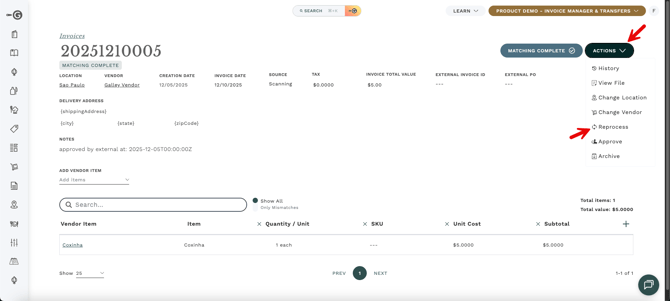
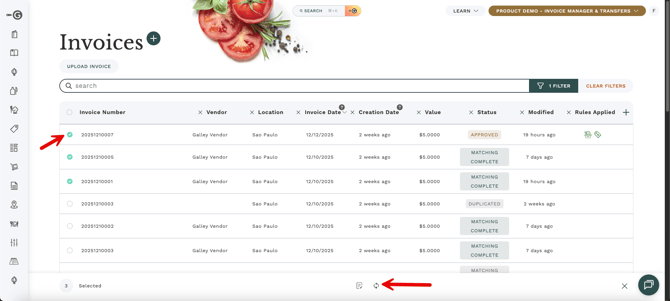
🚀 What’s New Sometimes you update a recipe, and you need the system to catch up. You can now force an invoice to "Reprocess." This is great for when you’ve mapped a new vendor or item and want old invoices to recognize the new data.
How to do it:
-
Single Dish: In the Invoice Page, click Actions → Reprocess.
-
Buffet Style: In the Invoice List, select multiple invoices and click Reprocess in the bulk action bar.
📦 Delivery to the wrong station? Change Vendor & Location
We’ve added two savory new actions to help you fix data entry errors without the headache.
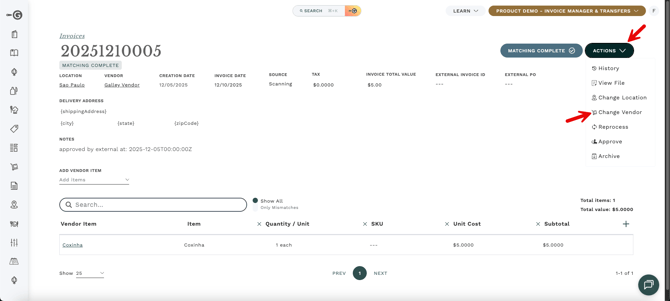
1. Change Invoice Vendor Mapped an invoice to "Produce Guy A" when it was actually "Produce Guy B"?
-
The Fix: Click Actions → Change Vendor.
-
The Result: We’ll reprocess the invoice and clean up any incorrect aliases created by the mistake.
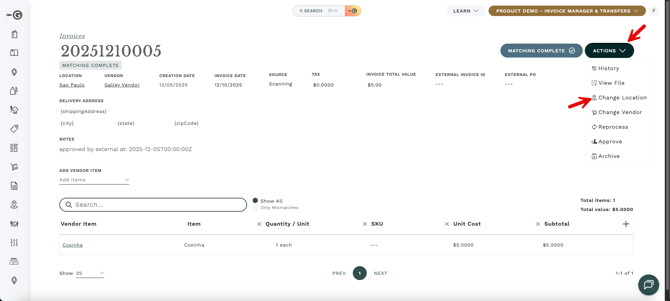
2. Change Invoice Location Invoice landed at the Downtown location but belongs to Uptown?
-
The Fix: Click Actions → Change Location.
-
The Result: The invoice moves to the correct house instantly.
(Note: Ensure you have "Edit Invoice Data" permissions for these actions!)
↩️ The "86 That Error" Features: Reopen & Unarchive
Sometimes, mistakes happen. We’ve added two "Undo" buttons to help you scrub the pass and start fresh.
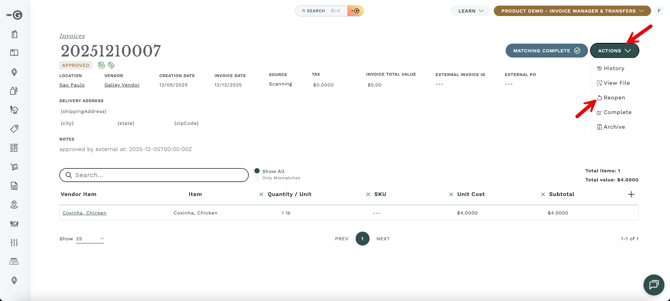
🔓 Reopen an Approved Invoice Need to fix data on an invoice you already approved?
-
Action: Click Actions → Reopen.
-
Result: The invoice moves back to "Matching Complete." All inventory movements and cost updates are reverted, allowing you to edit and re-approve.
📂 Unarchive an Invoice Accidentally filed something away?
-
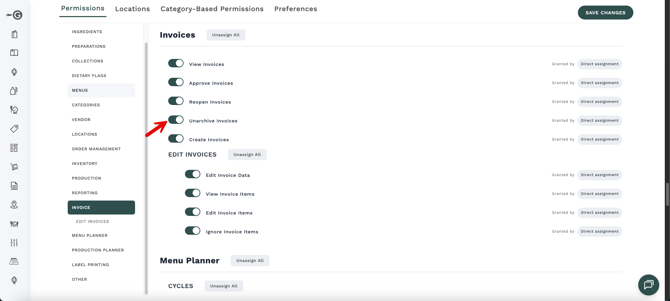
Action: Click Actions → Unarchive.
-
Result: The invoice returns to its previous state, ready for you to modify or approve.
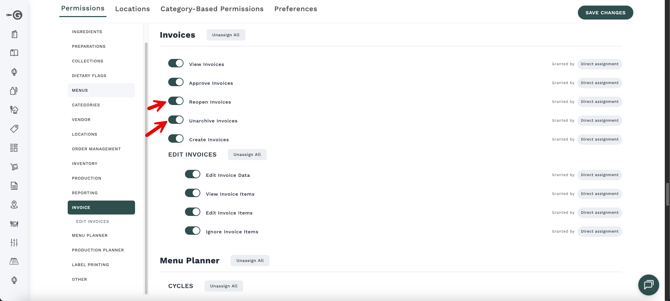
(Note: These require "Reopen Invoices" or "Unarchive Invoices" permissions).
If you have questions or feedback, reply to this message or contact your Galley support team.
Happy planning,
The Galley Team 👩🍳