
Sub-locations represent the storage areas at a given location. To learn how to set up Sub-locations in the article: How do I create and manage Sub-locations?
Cycle Counts & Sub-locations
Cycle counts can be created from sub-locations. The inventory levels at each sub-location are managed separately. So, when two cycle counts are submitted on the same day at the same location for two different sub-locations, the values do not overwrite each other. To create a cycle count from a sub-location, click the "+" in the cycle counts catalog. Then, select your desired location and sub-location within that location.
Note: A cycle count can only be created for a sub-location or a cycle count template.
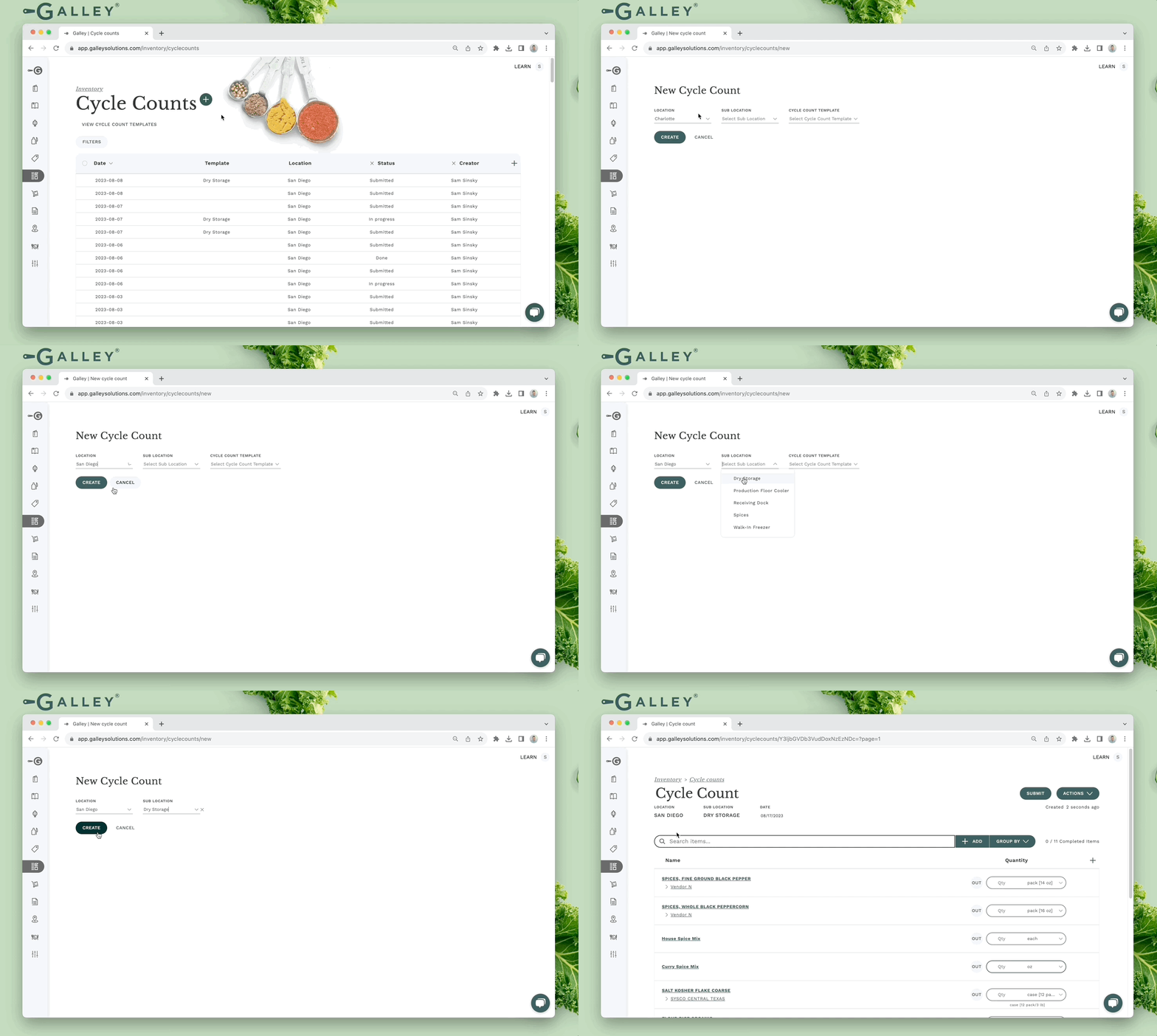
When a cycle count is created from a sub-location, the vendor items and recipes that are associated with the sub-location are added to the cycle count in the order that is set on the sub-location.
Receiving & sub-locations
Receiving to sub-locations is managed automatically by Galley. If a given vendor item is received and it is already included as a sub-location item at the location where it was received, the inventory will be received there.
If the vendor item does not yet have a sub-location item at the location, a sub-location item will be created for it at the default sub-location. If the vendor item has multiple sub-location items at the location, one will automatically be chosen.
Sales & sub-locations
Sales deductions will consider the inventory across all sub-locations. Therefore, no interaction is necessary to select the sub-location from which the inventory should be reduced.
Inventory Page & sub-locations
The inventory page displays the total amount of inventory on-hand for each vendor item across all sub-locations. For example, if one case was cycle counted in one sub-location and two cases were cycle counted in another, the total quantity and value on-hand will be for three cases.
Deleting sub-location Items
When a vendor item is deleted from a sub-location, the theoretical inventory value of the vendor item at that sub-location will be set to 0.