
Jump to: Overview · Add a yield · How it multiplies · On the recipe · Which recipes · Delete a yield · FAQ
What preparation yields do
You set a preparation yield on the ingredient page, in the Yield section, for each way your kitchen preps that ingredient. Recipes that use the ingredient with that preparation are then costed at the right yield automatically.
Whole carrots lose weight when you peel them, and they lose a little more when you dice them. The ingredient yield covers the first loss. A preparation yield covers the second, so a recipe that calls for 3 lb of diced carrots is costed for the carrots you actually have to buy.
You can set a preparation yield before any recipe uses that preparation, and every recipe line shows the yield it is costed at.
Preparation yields appear for companies that use preparations on their recipes. If you don't see the Preparations area on an ingredient, ask your Customer Success Manager.
Add a preparation yield on the ingredient
- Open the ingredient (for example, Carrots, Jumbo) and stay on the Main tab.
- Scroll to the Yield section. Under it, the Preparations area lists every preparation that already has a yield.
- Click Add preparation and pick a preparation from the list, or start typing to find it.
- The preparation is added at 100%. Nothing changes in your recipe costs yet.
- Type the yield of that preparation step in its Yield field, for example 85 for diced. It saves on its own.
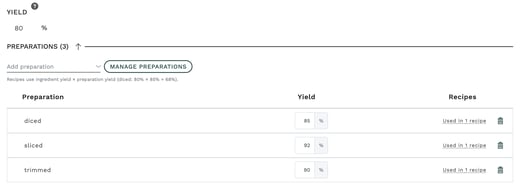
Any yield from 0.01% to 1000% is accepted. A value outside that range is not saved, and the field tells you why.
Use a yield above 100% for food that gains weight as you prep it, such as rice, dried beans or pasta that you cook, or dried mushrooms that you rehydrate. A yield of 250% means 1 lb of dry rice gives you 2.5 lb cooked.
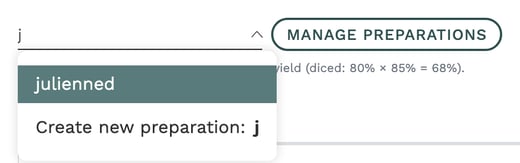
If the preparation you need doesn't exist yet, the list offers Create new preparation with the name you typed. Manage preparations, next to the list, opens the full list of your company's preparations.
How preparation yields combine with the ingredient yield
A preparation yield multiplies with the ingredient's own yield. Enter the loss from the preparation step only, never the combined figure.
Example: Carrots, Jumbo have an ingredient yield of 80% (what is left after peeling). Diced has a preparation yield of 85% (what is left after dicing peeled carrots). A recipe line with diced carrots uses 80% × 85% = 68%.
The line just under Add preparation does this calculation for you, so you can check your numbers as you type: "Recipes use ingredient yield × preparation yield (diced: 80% × 85% = 68%)."
If you type the combined figure (68%) as the diced yield, recipes multiply it by the ingredient yield again (80% × 68% = 54%), and those lines are costed about 25% too high.
| Ingredient yield | Preparation | Preparation yield | Yield the recipe line uses |
|---|---|---|---|
| 80% | diced | 85% | 68% |
| 80% | sliced | 92% | 73.6% |
| 80% | trimmed | 90% | 72% |
| 80% | (none) | 80% |
See preparation yields on your recipes
On a recipe's Components table, each preparation on an ingredient line shows its yield, for example diced · 85%. A preparation with no yield entered shows 100%.
To see the full yield each line is costed at, add the Line Yield column:
- Open the recipe and go to the Components table.
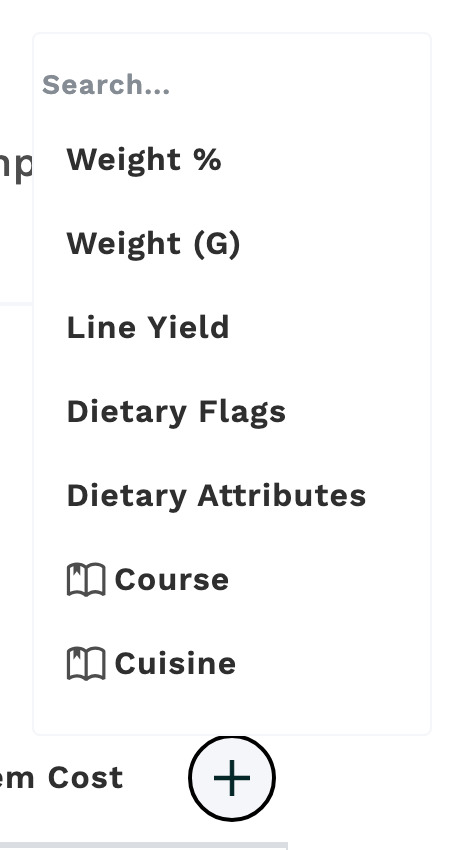
- Click the + at the end of the table header.
- Pick Line Yield.
Each line now shows the yield food cost uses in large type, with the yields it multiplies underneath (80% × 85%). A line with no preparation shows only the ingredient yield. Hover over the number to see the whole calculation, for example "Ingredient 80% × diced 85% = 68%".
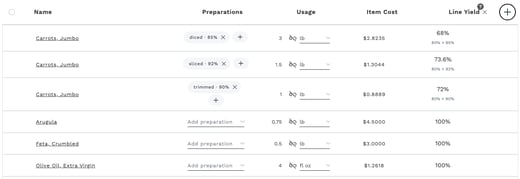

To hide the column again, click the × next to Line Yield.
See which recipes use a preparation
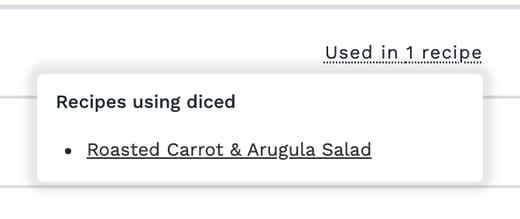
In the Preparations area of the ingredient, the Recipes column shows how many recipes use each preparation, for example Used in 1 recipe. Click it to see the list. Each recipe name opens that recipe in a new tab.
Delete a preparation yield
- On the ingredient, click the trash icon at the end of the preparation's row.
- If no recipe uses that preparation, confirm with Delete yield.
- If recipes use it, Galley warns you first and lists those recipes. Read the warning, then click Delete yield to go ahead or Go back to keep it.
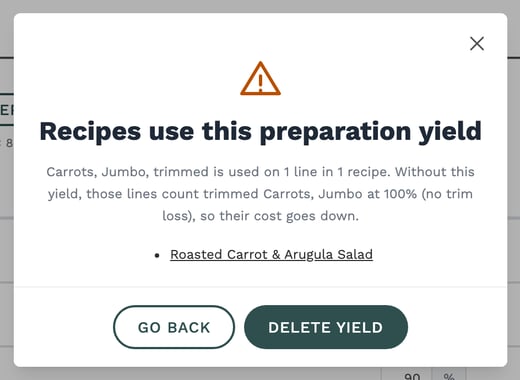
What the warning means for cost: without the preparation yield, those recipe lines count that preparation at 100% (no loss from that step). Only the ingredient yield still applies.
- For a preparation yield below 100% (diced at 85%), the lines' cost goes down, because Galley no longer adds the trim loss.
- For a preparation yield above 100% (cooked rice at 250%), the lines' cost goes up, because Galley no longer counts the weight gained.
Deleting a yield changes the food cost of every recipe in the list. If you only want a different number, type the new yield instead of deleting it.
Frequently asked questions
One of my preparations shows 0%. Is that being used?
No. A preparation yield of 0% was allowed before, but it means nothing is left, so recipes have always counted 0% as 100%. The field now tells you "Recipes count 0% as 100%." Type the real yield, or delete the preparation yield if you don't need it.
Can I enter a yield above 100%?
Yes, up to 1000%. Use it for food that gains weight as you prep it, such as cooked rice and beans or rehydrated dried mushrooms.
Do I have to add the preparation to a recipe first?
No. You can add a preparation and its yield on the ingredient page before any recipe uses it. Recipes pick it up as soon as you add that preparation to a line.
What happens if I leave a preparation's yield empty?
An empty yield counts as 100%, so that preparation changes nothing in your recipe costs.
A recipe line has two preparations. How is it costed?
Galley multiplies the ingredient yield by each preparation's yield. The Line Yield column shows every factor, so you can check the result.
I don't see the Preparations area or the Line Yield column.
Both appear for companies that use preparations on their recipes. Contact your Customer Success Manager if your company should have them.