
What is a primary image?
Every recipe in Galley can have one photo designated as its primary image. This is the photo that represents your recipe across the platform — in recipe book lists, recipe cards, and PDF exports.
If you don't set a primary image, Galley uses the first photo in your recipe's media library. Setting a primary image gives you control over which photo appears front and center.
Primary images can only be set on photos. Videos and documents cannot be used as primary images.
How to set a primary image
- Open your recipe and navigate to the Files tab
- Scroll to the Photos section
- Find the photo you want to use as your primary image
- Click the star icon near the top-right corner of the photo thumbnail
- You'll see a "Primary image set" confirmation message
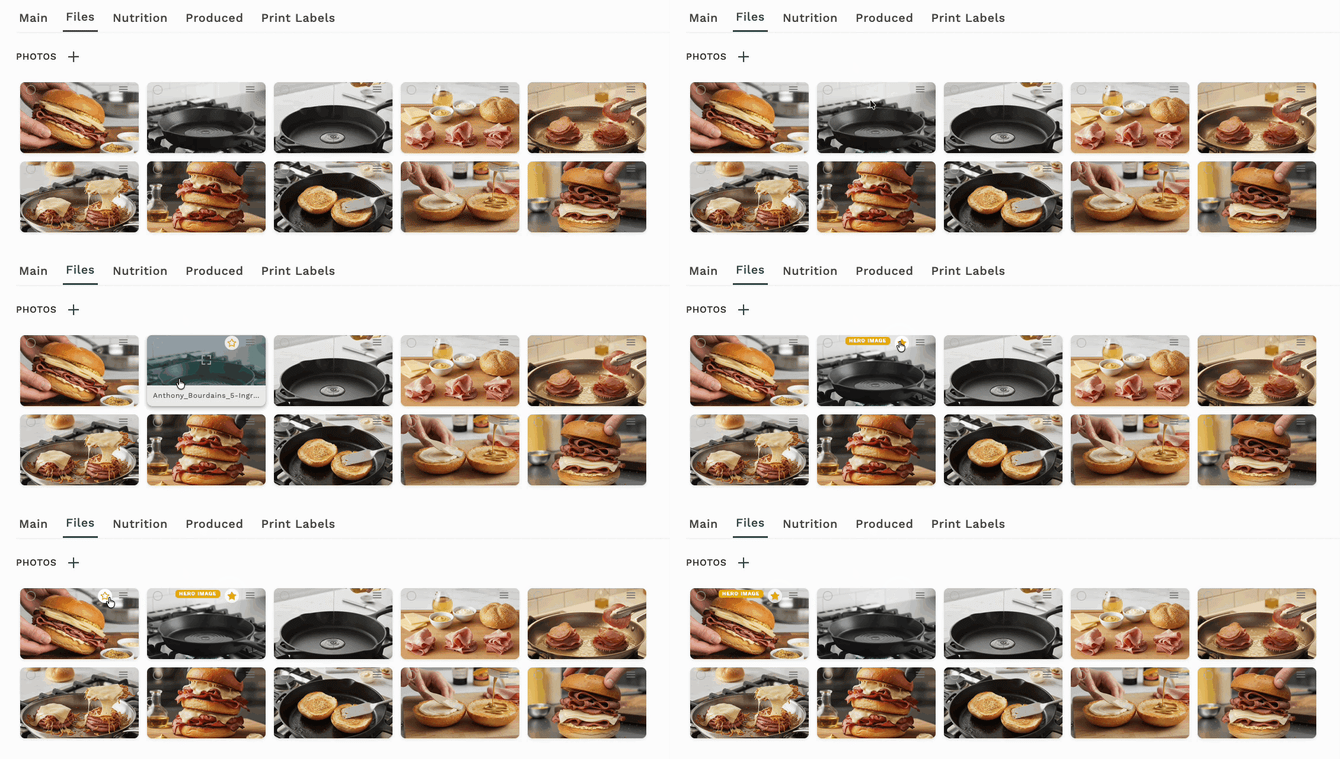
Once set, two things happen:
- The star icon fills in with solid yellow on the selected photo
- A yellow "Primary Image" badge appears on the thumbnail
The primary image updates immediately when you click the star — no need to save the recipe separately.
Changing your primary image
To switch to a different photo, simply click the star icon on the new photo you want to use. The primary image badge moves to the new photo automatically, and the previous photo's star returns to its outline state.
Clearing a primary image
To remove the primary image designation entirely:
- Find the photo with the filled star and "Primary Image" badge
- Click the filled star icon
- You'll see a "Primary image cleared" confirmation message
When no primary image is set, Galley falls back to using the first photo in your recipe's photo library.
Where your primary image is used
Your primary image appears in several places across Galley:
| Location | How it appears |
|---|---|
| Recipe books | Thumbnail image next to the recipe name in the recipe book list |
| Recipe cards | Featured image in the Components section of the recipe card |
| PDF exports | Header image at the top of the exported recipe PDF |
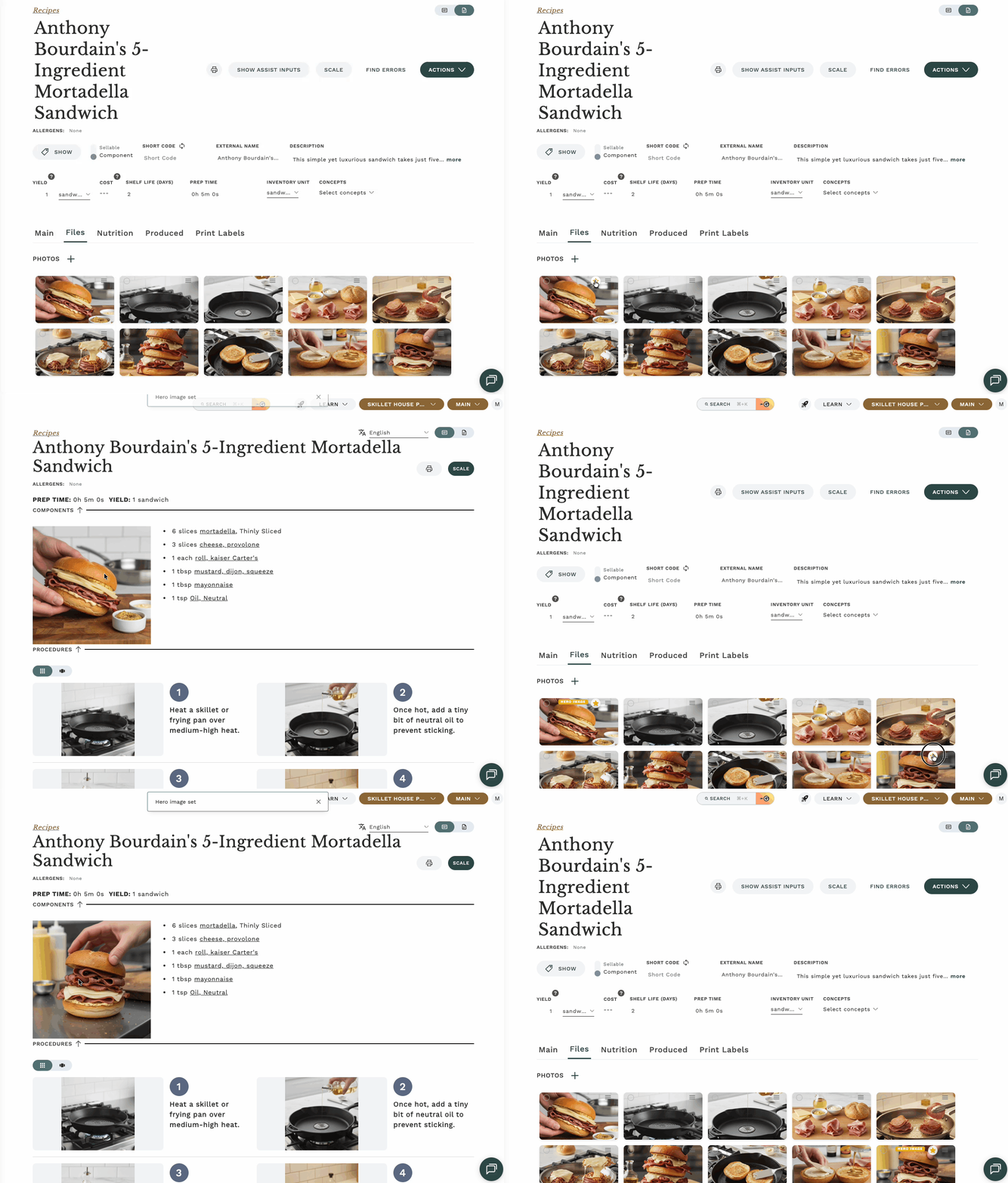
In each of these views, if no primary image is set, the first photo from the recipe's photo library is used instead.
Who can set a primary image?
You need edit access to the recipe's media to set or change the primary image. If you don't see the star icon on photo thumbnails, check with your admin to confirm you have the right permissions.
The star icon only appears on photo thumbnails for recipes you can edit. If a recipe is archived or you have view-only access, you won't see the star.
Troubleshooting
I don't see the star icon on my photos
- Make sure you're looking at the Photos section (not Videos or Documents)
- Confirm you have edit permissions for this recipe
- Check that the recipe hasn't been archived
I see "Failed to update primary image"
This usually means a temporary connection issue. Wait a moment and try again. If the problem persists, refresh the page and try once more.
My primary image isn't showing in the recipe book or PDF
- Verify the primary image is still set by checking for the yellow badge on the Files tab
- If you recently changed it, refresh the recipe book or regenerate the PDF
- Make sure the photo hasn't been deleted from the recipe's media library
Frequently asked questions
Can I set a video as my primary image?
No. Primary images are limited to photos only. Videos and documents cannot be used as primary images.
Can I set a primary image on ingredients or other items?
No. Primary images are currently available only on recipes.
What happens if I delete the photo that's set as my primary image?
The primary image designation is automatically cleared. Galley will fall back to showing the first photo in your recipe's photo library.
Does the primary image affect the order of photos in my recipe?
No. Setting a primary image doesn't change the order of your photos in the Files tab. It only controls which photo is featured in recipe books, cards, and PDF exports.