
Jump to: Overview · Before you start · Filter · Locations column · Good to know · FAQ
What the Location filter does
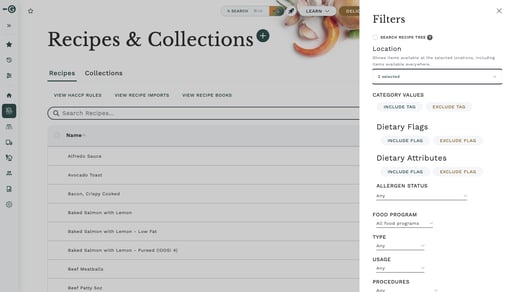
On Recipes or Ingredients, open Filters and choose Location, then pick one or more locations. The list shows what is published at those locations, plus anything available at all locations.
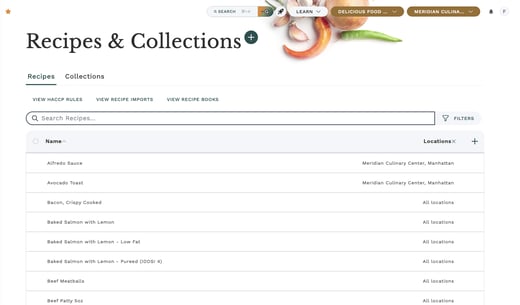
On Recipes, you can also add a Locations column that shows where each recipe is published, and sort by it.
Before you start
The Location filter and the Locations column only appear when:
- Your company uses the "Location-scoped products" company setting, and
- Your company has at least two locations.
The filter lists only the locations you have access to. If your company meets both conditions and you still don't see the filter, contact Galley Support.
Filter by location
- Go to Recipes (or Ingredients).
- Open Filters and choose Location.
- Pick one or more locations.
| Item is published at | Shown when you filter by Location A? |
|---|---|
| Location A | Yes |
| All locations | Yes |
| Only other locations | No |
See where each recipe is published
- On Recipes, select the + at the right of the table header.
- Choose Locations.
- Select the column header to sort by it.
| Locations column shows | Meaning |
|---|---|
| All locations | The recipe is available at every location |
| Named locations | The recipe is published at those locations |
| Not published | The recipe isn't published at any location |
Good to know
The Location filter only narrows the list. The location picker at the top of the screen still decides which costs, prices and dietary flags you see.
To review one site's recipes with that site's costs, choose the location in the picker at the top and pick the same location in the Location filter.
Frequently asked questions
Why do I see recipes from other locations in my filtered list?
Recipes available at all locations are always included, because they are available at the locations you picked too. Add the Locations column to tell them apart.
Why doesn't the filter list every location in my company?
The filter only lists the locations you have access to.
Does choosing a location in the filter change the costs I see?
No. Costs, prices and dietary flags follow the location picker at the top of the screen, not the filter.
I don't see the Location filter at all. Why?
It only appears when your company uses the "Location-scoped products" setting and has at least two locations. Ask your company admin whether that setting is on.