Jump to: Overview · Read the totals · Line matching · Warnings · Approve and reopen · Missing numbers · Troubleshooting · FAQ
Overview
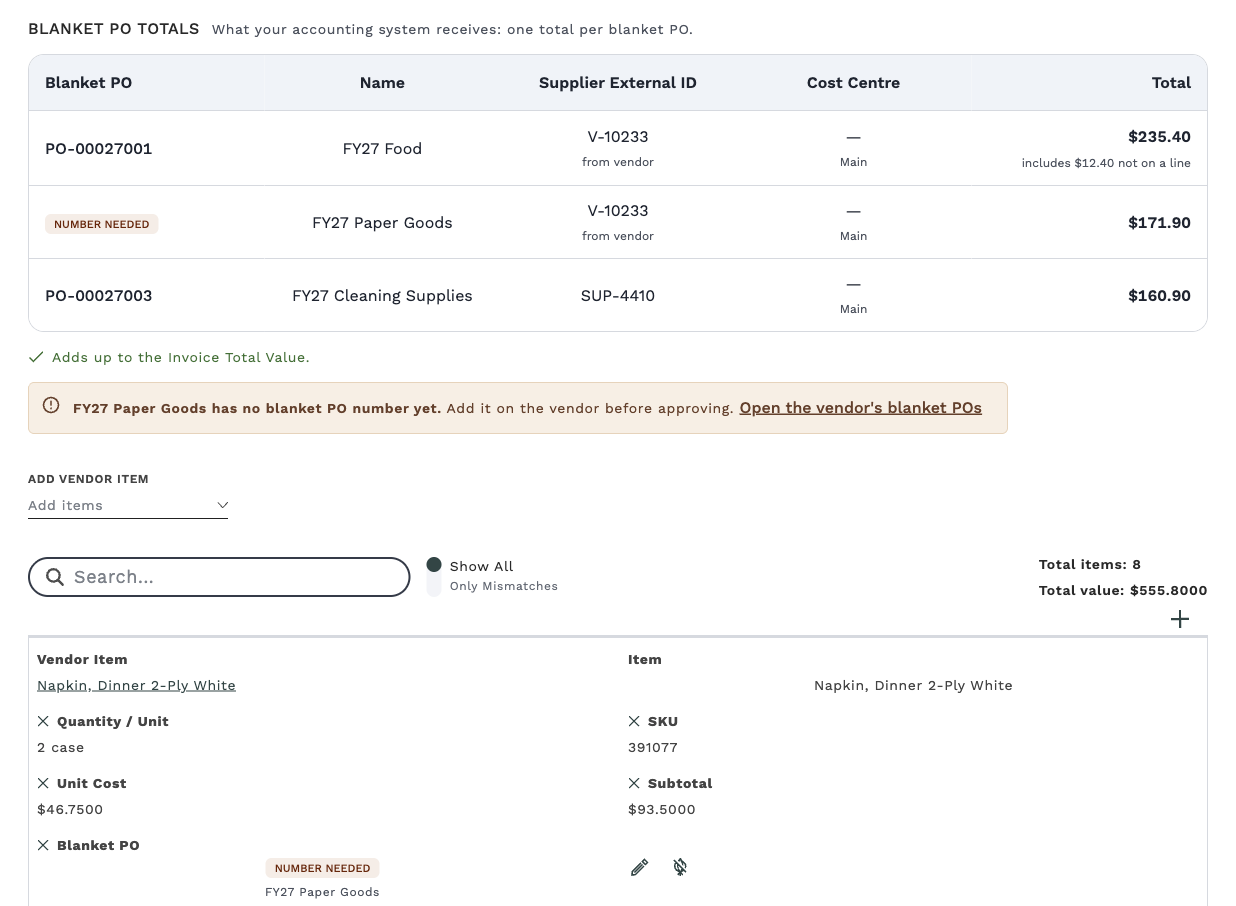
Open the invoice and look for the Blanket PO totals section above the line items. It shows one total for each blanket PO the invoice touches, which is what your accounting system receives. Each line item also shows its blanket PO in the Blanket PO column.
An invoice whose lines all go to one blanket PO has one row, equal to the Invoice Total Value. An invoice that covers items on two blanket POs has two rows that add up to the total. If something needs attention, a warning appears above or below the table.

The Blanket PO totals section appears only on an invoice from a vendor that has at least one blanket PO that isn't archived, even if that blanket PO has ended or hasn't started yet. An invoice from a vendor with none, or with no vendor yet, shows no section. If the vendor has blanket POs and you don't see the section, contact Galley Support.
On an invoice from a vendor with no blanket POs, the Blanket PO column in the line items reads None for every line. You can ignore it. Galley doesn't check that invoice against blanket POs, and the None doesn't affect approval.
Read the totals table
| Column | What it shows |
|---|---|
| Blanket PO | The blanket PO number. A "Number needed" chip means the blanket PO has no number yet. A "None" chip means the lines in this row aren't on any blanket PO. |
| Name | The blanket PO's name, such as "FY27 Food". |
| Supplier External ID | The supplier ID set on the blanket PO. If none is set, Galley shows the vendor's External ID with "from vendor" underneath. |
| Cost centre | The External ID of the invoice's location, with the location's name underneath. It shows a dash if the location has no External ID. |
| Total | What goes to your accounting system for this blanket PO, rounded to the whole cent. |
When part of the Invoice Total Value isn't on any line, such as tax, shipping or a discount printed only in the invoice total, Galley adds it to one row and notes it under the total, for example "includes $12.40 not on a line". The amount goes to the vendor's all-items blanket PO that covers the Invoice Date, even if no line is on it. If the vendor has none, it goes to the invoice's only row, or otherwise to a None row.
When the rows add up to the Invoice Total Value, a green check says "Adds up to the Invoice Total Value."
A total can be zero or negative when credits or discounts are larger than the lines on a blanket PO. Rows that come to zero are hidden. If every row comes to zero, Galley shows one of them.
How each line gets its blanket PO
Galley matches every line to a blanket PO using the vendor item on the line and the Invoice Date. It uses the Invoice Date, not the day you approve the invoice, so a late-June invoice approved in July still goes to the blanket PO that covers June.
- A line for a vendor item goes to the selected-items blanket PO the item is assigned to, if that blanket PO covers the Invoice Date.
- Otherwise it goes to the vendor's all-items blanket PO that covers the Invoice Date.
- Fee and tax lines, and lines with no vendor item, go to the vendor's all-items blanket PO. If the vendor has none, they go to the blanket PO that every other line is on.
- A line that none of these reach is on no blanket PO. If the vendor has blanket POs, it is counted in a row marked None.
You can't change a line's blanket PO directly. To change where a line goes, assign its item to a different blanket PO, adjust the blanket PO's dates, or correct the Invoice Date.
Fix a warning before you approve
Warnings appear in the Blanket PO totals section, so only on invoices from a vendor that has blanket POs. Most of them include a link, "Open the vendor's blanket POs", which opens the Blanket POs tab on the invoice's vendor.
| Warning | What it means | What to do |
|---|---|---|
| This invoice shows PO [number], which is not one of its blanket POs. Check the vendor before approving. | The PO number in the invoice's External PO field doesn't match any blanket PO on its lines. Galley ignores capital letters, spaces and punctuation when it compares. This often means the invoice is filed under the wrong vendor. | Check the Vendor on the invoice. If it's wrong, choose Change Vendor in the Actions menu before you approve. If the External PO number was read wrongly, correct it. If the number is right but missing from the blanket PO, add it on the vendor. |
| [Amount] is not on a blanket PO. No blanket PO on this vendor covers these lines on the invoice date. Add one before approving. | Some lines aren't covered by any blanket PO on the Invoice Date. | Check the Invoice Date. If it's right, open the vendor's blanket POs and add or adjust a blanket PO to cover it. |
| [Name] has no blanket PO number yet. Add it on the vendor before approving. | The blanket PO exists but its number hasn't been entered. | Open the vendor's blanket POs, choose Edit on that blanket PO, and enter the number. |
| Couldn't work out the blanket PO totals. | Galley couldn't calculate the totals just now. | Click Try again. |
To add or edit a blanket PO, you need the Edit Vendor and Vendor Item Data permission. If you don't have it, ask a purchasing admin to make the change, then reload the invoice to see the updated totals.
What happens when you approve or reopen
Before you approve an invoice, the totals follow your current blanket POs. They update when you change the invoice or its lines. If you change a blanket PO on the vendor page, reload the invoice to see the new totals.
When you approve the invoice, Galley saves each line's blanket PO with it. From then on, the totals don't change, even if you later edit or archive the blanket PO. The invoice keeps the number, name and supplier ID the blanket PO had, but a supplier ID shown "from vendor" follows the vendor's External ID as it is now. An invoice from a vendor with no blanket POs has none to save.
To change an approved invoice, choose Reopen in the Actions menu, fix the cause, and approve it again. Reopening clears the saved blanket POs, so the lines follow your current blanket POs again until you approve. Galley lists everything else that reopening does before you confirm.
If you approve an invoice while a row shows Number needed, the invoice keeps that missing number. Adding the number to the blanket PO later doesn't change the invoice. Reopen it and approve it again to pick up the number.
Missing numbers and automatic approval
An invoice with a row that has no blanket PO number, including a None row, isn't ready for your accounting system. Galley doesn't approve that kind of invoice automatically. If one of your approval rules is set to Auto Approve, Galley leaves the invoice for you to approve by hand when a row has no number, or when the PO number printed on the invoice doesn't match.
These checks apply only to invoices from a vendor that has blanket POs. An invoice from a vendor with none, or with no vendor yet, has no blanket PO totals, so there is nothing to check. Your approval rules handle it the same way as they would if your company had no blanket POs.
You can still approve these invoices by hand, unless your company has turned on the optional setting Blanket PO number required for approval. With it on, Galley won't approve an invoice until every row in its Blanket PO totals has a number. A None row has no number, so it blocks approval too. The setting never blocks an invoice from a vendor with no blanket POs.
This applies whether you approve one invoice or several at once. If you approve several and any one of them is blocked, Galley approves none of them. The message names the invoices and blanket POs to fix.
The setting is off by default. It isn't in Settings. To turn it on or off, contact Galley Support, or your Customer Success Manager.
Warnings appear on the invoice page. If you approve several invoices at once from the invoice list, you don't see them. For a vendor that uses blanket POs, open an invoice first if you want to check its totals.
Troubleshooting
| What you see | Why it happens | What to do |
|---|---|---|
| No Blanket PO column in the line items | The column isn't in your column layout. | Click + at the right end of the line items header row and add Blanket PO. |
| A None row in the totals | No blanket PO on the vendor covers those lines on the Invoice Date, or the invoice has no Invoice Date yet. | Check the vendor and the Invoice Date, then add or adjust a blanket PO on the vendor. |
| No Blanket PO totals section, and every line reads None | The invoice has no vendor yet, or its vendor has no blanket PO that isn't archived. Galley checks blanket POs only for vendors that have them. | If the vendor doesn't use blanket POs, there is nothing to fix. If it should, check the Vendor on the invoice, or add a blanket PO on the vendor. |
| Cost centre is blank | The invoice's location has no External ID. | Add an External ID to the location. |
| Totals still show an old blanket PO after you changed it | The invoice is approved, so it keeps the blanket PO it was approved with. | Reopen the invoice and approve it again. |
| Totals don't update after a change on the vendor page | The invoice page is showing the earlier totals. | Reload the invoice. |
| A message that starts "A blanket PO number is required before approval." and names the invoice, such as: Invoice 3175841: blanket PO "FY27 Paper Goods" has no number; some lines are on no blanket PO. | Your company has Blanket PO number required for approval turned on, and the invoice has a row with no number. "Some lines are on no blanket PO" is the None row. | Open the vendor's blanket POs, add the missing number or a blanket PO that covers those lines, and approve again. |
FAQ
Does this change my invoice total?
No. Blanket PO totals divide the Invoice Total Value between blanket POs, so your invoice total stays the same. If the Invoice Total Value is blank or zero, the rows add up to the line items instead.
Why is there a row for an amount that isn't on a line?
Tax, shipping or a discount can be printed only in the invoice total. Galley adds that amount to a row so the rows add up to the Invoice Total Value. The row's total says how much was added.
What if an invoice is for two blanket POs?
Galley shows one row for each. Your accounting system receives one total per row, and each row carries its own blanket PO number.
I set up blanket POs for a vendor after I approved some of its invoices. Will those invoices change?
Invoices approved before the vendor had blanket POs weren't saved with a blanket PO. Once the vendor has its first blanket PO, their totals follow the vendor's current blanket POs. To save the totals with an invoice, reopen it and approve it again.
Where do I add or change the blanket PO number?
On the vendor's Blanket POs tab. See "How do I set up blanket POs for a vendor?"