
Jump to: Overview · Company default · One label · What changes · FAQ
What Alphabetize Allergens does
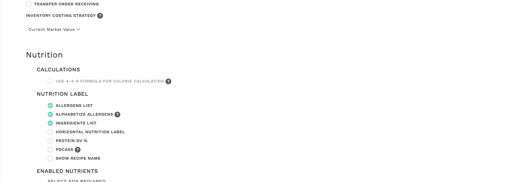
Tick Alphabetize Allergens in the Nutrition Label section: an admin can do this once for the whole company under Settings, or anyone can tick it on a single label. The Contains line then lists allergens A to Z, for example Gluten, Milk, Wheat instead of Milk, Wheat, Gluten.
Ingredient names shown in brackets are sorted too, for example tree nuts (Almond, Walnut).
This needs Nutritionals on your account. The company setting is off by default, so labels keep their current order until an admin turns it on. If you don't see Alphabetize Allergens, contact Galley Support.
Turn it on for your whole company
You need to be an account admin for this step.
- Open Settings and go to the company settings tab.
- Find Nutrition, then the Nutrition Label section.
- Tick Alphabetize Allergens and save.
Nutrition labels you open from then on list allergens alphabetically.
Alphabetize a single label
- Open a recipe and go to Nutrition.
- Open Nutrition Label.
- Tick Alphabetize Allergens. The Contains line sorts A to Z.
- Untick it to go back to the order the allergens were attached in.
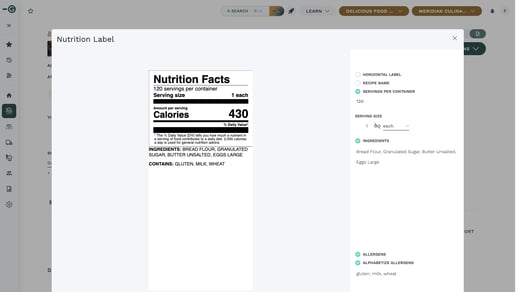
The checkbox on a single label is not saved. When you close and reopen the label, it follows the company setting again.
Alphabetize Allergens is greyed out when Allergens is unticked on the label, because there are no allergens to sort.
What changes and what doesn't
| Changes | Doesn't change |
|---|---|
| The order of allergens on nutrition labels in Galley | Recipe PDFs and printed labels, which keep their current order |
| The order of ingredient names in brackets | What guests see on a shared recipe link or QR code |
| Which allergens a recipe has: nothing is added, removed or renamed |
Frequently asked questions
I ticked Alphabetize Allergens on a label, but it's back to the old order. Why?
The checkbox on a single label isn't saved. Reopening the label goes back to the company setting. To make alphabetical the default, ask an admin to turn on the company setting.
Will my printed labels and recipe PDFs change?
No. Recipe PDFs and printed labels keep their current order.
Does this change which allergens a recipe has?
No. Only the order changes. Allergens are not added, removed or renamed.
Why is Alphabetize Allergens greyed out?
Allergens is unticked on that label. Tick Allergens first.