
Jump to: Overview · Duplicate · What's copied · Locations · FAQ
What duplicating a recipe book does
Open the recipe book, choose Actions, then Duplicate. Galley creates a copy named "<original name> (Copy)" and opens it for you, ready to rename and adjust.
The copy brings over the book's folders, recipes, media, menus, menu plans, collections and display settings. It is a quick way to set up a new site or a new season from a book you already trust.
You need permission to edit recipe books to see Duplicate. If you don't see it, ask your company admin about your role. If you have the permission and still don't see it, the feature may not be turned on for your company yet: contact Galley Support.
Duplicate a recipe book
- Go to Recipes and choose View Recipe Books.
- Open the book you want to copy.
- Choose Actions, then Duplicate.
- Galley opens the new book, titled "<original name> (Copy)", and shows "Recipe book duplicated".
- Rename the copy and make your changes. The original book is not changed.
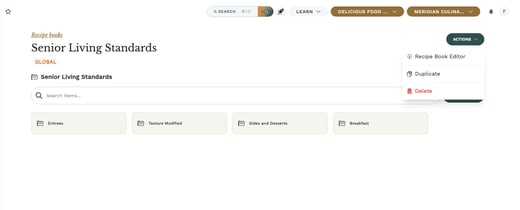
There is no confirmation step: the copy is created as soon as you choose Duplicate. If you made one by mistake, open the copy and choose Actions, then Delete.
What the copy includes
| Copied | Not copied |
|---|---|
| Folders | Translated folder and item names |
| Recipes (the copy lists the same recipes as the original) | Separate copies of each recipe |
| Media | Public (guest) access: the copy starts private |
| Menus and menu plans | |
| Collections | |
| Display settings |
The copy starts private. Nothing in it is shared with guests until you turn public access on for the new book.
The recipes themselves are not duplicated. Both books list the same recipes, so you don't end up with two versions of each recipe to keep in step.
If you work at only some locations
If your access is limited to some of your company's locations, the copy follows your access:
- When you copy a book available at every location, the copy is set to your own locations only. Galley shows a warning saying how many locations were left out.
- You can't copy a book that is restricted to locations you don't all have access to.
Frequently asked questions
Can I rename the copy?
Yes. The copy is a normal recipe book named "<original name> (Copy)". Rename it like any other book.
Will guests see the copy straight away?
No. The copy starts with public (guest) access off, even if the original is public. Turn it on when the new book is ready.
Why are my translations missing in the copy?
Translated folder and item names are not copied. Add the translations to the new book if you need them.
Why don't I see Duplicate in the Actions menu?
Duplicate only shows for people who can edit recipe books. Ask your company admin to check your role.