
Jump to: Overview · Find approved events · Making a change · Without permission · FAQ
How approved events are protected
Not without asking you first. If a change would return approved events to draft, Galley lists those events by name and date and asks whether to go ahead. Where Galley can't ask, the approved event is locked instead.
This lets Executive Chefs, Registered Dietitians and unit managers rely on an approval once it is given.
Only people with permission to unapprove events can go ahead with a change that affects approved events. If you don't see this behavior in the Menu Planner, contact Galley Support.
See which plans have approved events
In Menu Planner, the Plans list has an Approved Events column. It shows how many of a plan's events are approved, for example "8 of 14".
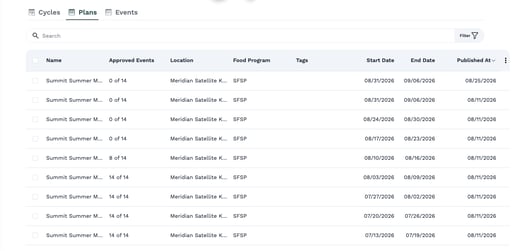
When a change reaches approved events
1. Open a menu plan in Week view. 2. Make your change. For example, open an event's menu (the three dots) and choose Rename Event. 3. If the change reaches approved events, Galley first shows "Approved events will return to draft" and lists them by name and date. 4. Choose what to do: - Go back: nothing changes and the events stay approved. - Continue and unapprove: Galley makes the change, returns the listed events to draft, and shows "Unapproved N events". 5. Review the change and approve the events again when they are ready.
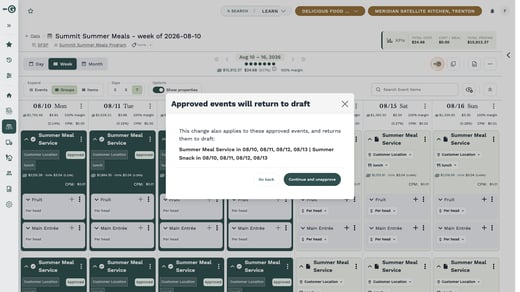
Continue and unapprove returns every listed event to draft. Galley does not approve them again for you, so remember to re-approve them.
Read-only approved events
On screens where Galley can't ask first, an approved event is read-only. For example, in the Condensed week layout, clicking an item on an approved event shows "Approved. Unapprove it in week view to edit." Go to Week view to make the change there.
If you can't unapprove events
If you don't have permission to unapprove events, Galley doesn't change approved events at all. When you try, it tells you to ask someone who can unapprove, and nothing changes.
Frequently asked questions
Does this stop my team from ever changing an approved menu?
No. Someone who can unapprove events can still make the change. Galley adds a clear step that shows what will return to draft, rather than locking the menu.
What happens if I choose Go back?
Nothing changes. Your edit is not made, and the events stay approved.
Will Galley approve the events again after my change?
No. Events that returned to draft stay in draft until someone approves them again.
Why can't I edit an item on an approved event?
That screen keeps approved events read-only. Open the plan in Week view, where Galley can show you what will return to draft and ask before going ahead.