
Configuring Sub-Recipes for Dual-Portion Meals
Overview
Many operations serve the same dish in two portion sizes: a regular portion and a high-calorie or high-protein option. A common example is beef stew served as a 6 oz regular portion and an 8.5 oz high-calorie portion.
By default, these are often built as two separate sub-recipes in Galley (e.g., "Beef Stew" and "Beef Stew - High Calorie"). The problem: because they're treated as different recipes, production does not combine their ingredient quantities. The chef has to manually add them together to know how much to actually make.
This article explains how to restructure your recipes so that production automatically calculates the combined total, with no manual math required.
When to Use This Approach
Use a single shared sub-recipe with custom units when:
- The regular and larger versions are made from exactly the same ingredients in the same ratios
- The only difference is the portion size (i.e., a larger scoop/portion of the same prepared dish)
Do not use this approach if the high-calorie version has different ingredients or different proportions (for example, more protein but the same amount of everything else). In that case, the two versions are produced differently and should remain separate sub-recipes.
The Fix: One Sub-Recipe, Two Custom Units
Instead of maintaining two separate sub-recipes, consolidate them into one sub-recipe with two custom units representing each portion size.
Example
Dish: Beef Stew Regular portion: 6.04 oz (custom unit= blue scoop) High-calorie portion: 8.57 oz (custom unit= white scoop)
Step 1: Add Custom Units to the Shared Sub-Recipe
- Open the sub-recipe you want to consolidate (e.g., "Beef Stew").
- Navigate to the Unit Conversions section of the recipe.
- Add a custom unit for the regular portion:
- Name:
Regular Portion - Conversion:
1 Regular Portion = 6 oz
- Name:
- Add a custom unit for the high-calorie portion:
- Name:
High Calorie Portion - Conversion:
1 High Calorie Portion = 9 oz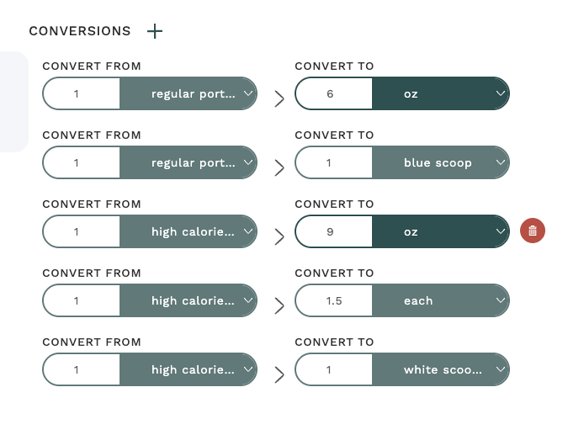
- Name:
You now have one sub-recipe that can be referenced in any parent recipe at either portion size.
Step 2: Update the Regular Plated Recipe
Open the regular plated meal recipe (e.g., "Beef Stew Plate - Regular").
- Remove the old "Beef Stew (Regular)" sub-recipe ingredient line.
- Add the shared "Beef Stew" sub-recipe.
- Set the unit to
Regular Portionand quantity to1.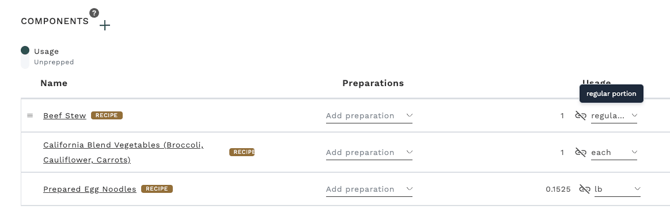
Step 3: Update the High-Calorie Plated Recipe
Open the high-calorie plated meal recipe (e.g., "Beef Stew Plate - High Calorie").
- Remove the old "Beef Stew (High Calorie)" sub-recipe ingredient line.
- Add the same "Beef Stew" sub-recipe.
- Set the unit to
High Calorie Portionand quantity to1.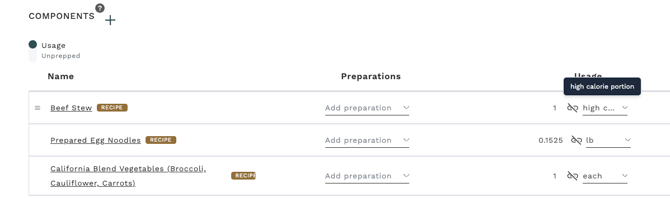
All other components in both plated recipes (vegetables, noodles, etc.) stay as-is.
Step 4: Verify in the Menu
Place both plated recipes on your menu as usual with the correct portion counts for each. No changes are needed at the menu level.
What Changes in Production
Before this change, production listed the regular and high-calorie beef stew as separate line items in your production export. The chef had to manually add the quantities together.
After this change, production shows one combined line item for "Beef Stew" with the total quantity needed across both portions.
Example: If a menu has 723 regular portions and 50 high-calorie portions:
- Regular: 723 × 6 oz = 4,338 oz
- High-calorie: 50 × 9 oz = 450 oz
- Combined production line: 4,788 oz or 299.25 lbs beef stew total
The chef makes one batch. At portioning time, the separate plated recipe pages still appear in the production packet showing 723 of the regular and 50 of the high-calorie, so the team still knows how many of each to plate.
Nutrition
Nutrition calculates correctly with this setup. Each parent recipe references the sub-recipe at its specific portion size, so the nutrition for each plated meal reflects the actual amount served.
- The regular plated meal calculates nutrition based on 6 oz of beef stew
- The high-calorie plated meal calculates nutrition based on 9 oz of beef stew
No nutrition data is lost or averaged by sharing the sub-recipe.
When You Still Need a Custom Export
If the shared sub-recipe approach does not work for your operation (for example, because your high-calorie and regular versions have different ingredients), Galley can build a custom production export that groups recipes by a tag. Contact your CSM to discuss this option.